
Facebook beneficiary and payer verification: what to check
Understand Facebook beneficiary and payer verification requests, check the affected ad account, prepare genuine information and review service terms.

Contents(10)
- Beneficiary and payer: two different roles
- Why does the request appear on some accounts?
- Prepare four things before starting
- A practical sequence for reading the request
- Still unable to advertise?
- When to review ADSWAR's service
- Frequently asked questions
- How long does verification take?
- Can I use another person's identity?
- Does a green account avoid verification?
Facebook asks for beneficiary or payer verification? First identify which ad account and which person or organization the request concerns. Do not substitute names or buy a service based only on a similar-looking warning. Use the checklist below to understand the task before proceeding.
Review beneficiary-verification service details
Beneficiary and payer: two different roles
The beneficiary is the person or organization benefiting from an ad. The payer is the person or organization paying for it. They may be the same or different, depending on the actual arrangement. Do not make them identical merely to finish the form.
For example, a shop advertising its own goods and paying directly may occupy both roles. An agency paying for a client should check the requested role and use truthful business information. This example does not replace the instructions shown for your account.
Why does the request appear on some accounts?
Meta says advertiser verification can depend on advertising location, policy history and the type of advertising. Follow the request and any deadline shown in your own account. See Meta's advertiser-verification announcement.
Identity verification, business verification and beneficiary disclosure may be related tasks, but they should not automatically be treated as interchangeable.
The first example shows the notification banner; the next shows the preparation dialog. Follow the actual request in your account.
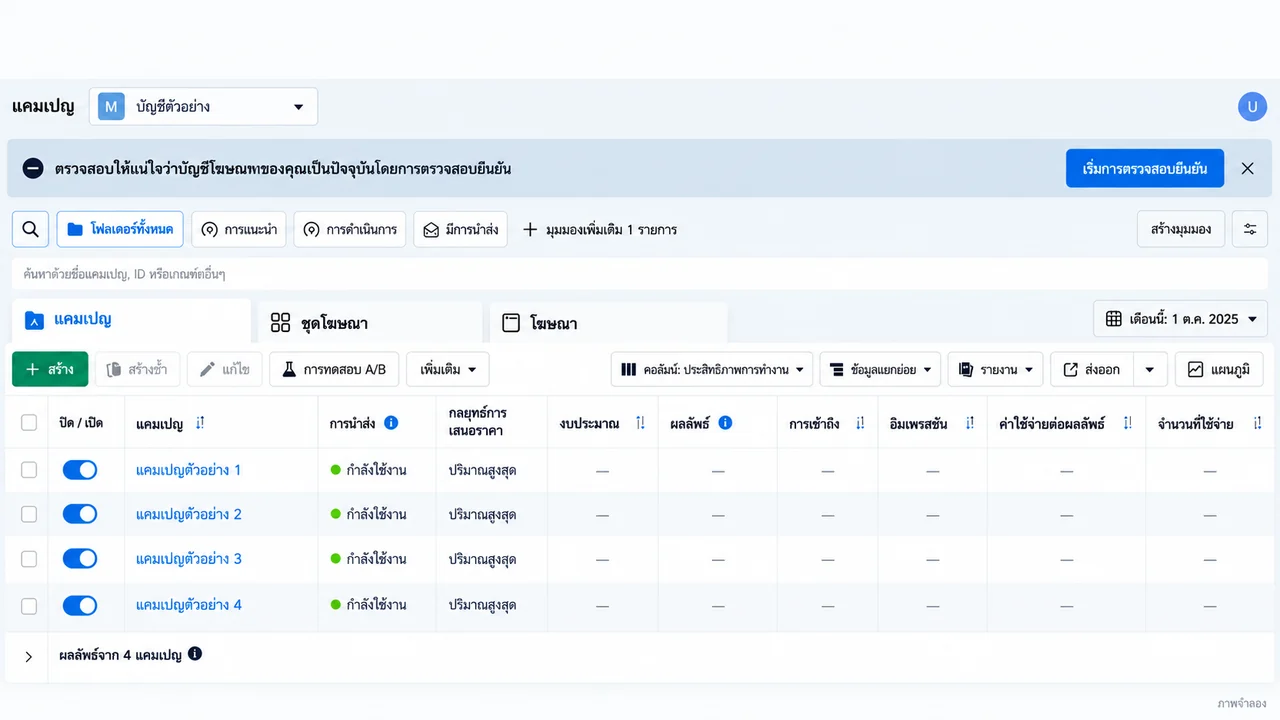

Prepare four things before starting
- The correct ad account: verify its name and identifier privately.
- Permissions: identify the authorized person who can complete the task.
- Truthful participant details matching genuine documentation if requested.
- A separate list of other issues, such as payment problems or rejected ads.
A practical sequence for reading the request
This is a decision checklist, not a fixed menu path. Available screens depend on your account, language and access.
- Open Ads Manager or Business Support Home yourself and select the affected ad account.
- Read whether the request concerns beneficiary, payer, personal identity or business information.
- Enter the real participant details. Ask an authorized business representative to confirm unclear roles before submitting.
- If Meta requests documents, upload through its official flow using the requested document type. Do not borrow someone else's identity or share passwords and OTPs in public chat.
- Return to the same account and inspect the result and remaining tasks.
Keep the submission date and status message. Avoid contradictory submissions. If the interface offers a review or further-information option, use it. Creating repeated requests does not guarantee faster processing.
Still unable to advertise?
| Situation | Next check |
|---|---|
| Pending review | Existing request status and any additional information required |
| No action button | Selected account and authorized administrator's permissions |
| Information mismatch | Names, roles and genuine business documents |
| Verified but ads not delivering | Ad status, payment and separate restrictions |
Completing one verification task does not guarantee every ad will be approved or that no future request will appear. Meta determines its own review outcomes.
When to review ADSWAR's service
Our beneficiary-verification service provides a product page with current pricing and terms. Ask an administrator to confirm the scope using the warning text and a redacted screenshot before ordering. Submit requested identity documents through Meta's own flow.
The listing states a 7-day warranty for loss of the verification status. Confirm the starting point, coverage and exclusions before work begins. Store service terms are distinct from Meta's approval decisions.
The live category below contains both services and ad-account products. Select the item matching your need. Do not purchase a replacement account to evade an existing restriction.

Ad Accounts – THB 1,600–8,000 Limit3
View all- 1,000 accounts
THB 675
THB 990
- Facebook Account with Ad Account | THB 8,000 Limit | 2009–2024 | Minimum 5Charge cover <THB500; terms applyBeneficiary verifiedEmail receives verification codes+21,000 accounts
THB 2,299
price per account
- Facebook Account with Ad Account | THB 8,000 Limit | 2009–2024 | Minimum 1Charge cover <THB500; terms applyBeneficiary verifiedEmail receives verification codes+21,000 accounts
THB 2,499
price per account
Frequently asked questions
How long does verification take?
There is no universal time for every account. Follow the status shown and confirm any service scope before payment.
Can I use another person's identity?
Use genuine information for the role requested, not a borrowed identity.
Does a green account avoid verification?
No such conclusion follows from a marketplace label. See how to check green account status.
Check service scope, price and warranty
Further reading: Meta's ad-transparency update describes payer and beneficiary information when available; regional experiences can vary.
Related posts
Back to Blog
Facebook and business portfolios
Hidden green Facebook checkmark in 2026? Read the access status
A green Facebook checkmark is missing? Read the restoration message, inspect each asset and compare current green-account specifications and stock.

Facebook and business portfolios
Cannot create a Facebook Page? Check the error and compare Fanpages
Facebook Page creation shows a Page policies error? Check the message, account access and options, then compare Fanpage prices, stock and handover terms.

Facebook and business portfolios
Facebook cannot post? Keep work moving and compare account options
Distinguish Facebook app errors, removed posts and account restrictions. Check the status and compare new, aged and friend-count account listings.