
Facebook Account with 9 Ad Accounts: Pros, Cons and Essential Backup Admin Setup
One Facebook account with nine ad accounts for THB 1,590, reduced from THB 2,000. Compare the benefits, limitations, initial-check warranty and backup admin setup before use.

Contents(19)
- What comes with one Facebook account and nine ad accounts?
- Why consider a bundle with nine ad accounts?
- 1. One purchase gives you multiple accounts for organizing projects
- 2. Review work and costs by account
- 3. Bundle pricing makes the starting cost easier to plan
- 4. A starting point for assigning access to your team
- Drawbacks and limitations to understand before buying
- Important: set up a backup ad account admin before starting work
- How to add a backup admin to an ad account
- Backup admin checklist
- What should you check on delivery before adding an admin and starting work?
- Read this bundle's warranty conditions before buying
- Who is this bundle for, and who should think carefully?
- Common questions about the nine-ad-account bundle
- Do I receive nine Facebook accounts?
- Does adding a backup admin once cover all nine accounts?
- Can an ad account still be disabled if it has a backup admin?
- Does THB 1,590 include advertising spend?
- Need multiple accounts in one bundle? View this product
Nine ad accounts, with one Facebook account holding all the access: if that main account becomes inaccessible, work across the whole bundle could be disrupted at once. This is worth understanding before choosing a Facebook account with multiple ad accounts. The number of accounts you receive and how you retain access to them are separate matters.
If you manage several projects, ADSWAR's bundle of one Facebook account with nine personal ad accounts is an option to consider at THB 1,590, reduced from THB 2,000. This article explains its value, its limitations, and how to prepare a backup admin before putting the accounts to work.
What comes with one Facebook account and nine ad accounts?
- One Facebook account for accessing the ad accounts in the bundle.
- Nine personal ad accounts associated with that Facebook account. This is not a bundle of nine Facebook accounts.
- The Change All model supports changes to account information. Which details can be changed and the verification steps depend on Facebook's permissions and checks.
- The account country is random. Check each account's country, currency and information before use.
The price covers the account bundle, not advertising spend. Check the payment methods, available spending limit and advertising status in the actual accounts before starting work. A model name does not replace checking the information in Ads Manager.
Why consider a bundle with nine ad accounts?
1. One purchase gives you multiple accounts for organizing projects
If you have several brands or projects, or want to keep work organized, multiple ad accounts give you more options for structuring work than a single account. You do not have to look for additional account bundles one at a time from the outset. Always check Facebook's permissions and conditions before deciding which account to use for which work.
2. Review work and costs by account
Once the accounts are set up and you have the required permissions, you can select an ad account to review its campaigns, reports and billing. This can reduce confusion when switching between projects, especially if you manage several projects and check spending regularly.
3. Bundle pricing makes the starting cost easier to plan
The selling price is THB 1,590, reduced from THB 2,000: a saving of THB 410. Dividing the bundle price by nine ad accounts works out to approximately THB 177 per ad account. This is only a way of comparing the bundle's cost. It is not a separate selling price and does not represent included advertising budget.
4. A starting point for assigning access to your team
After checking the delivered accounts, and where the system permits it, you can arrange admin access to suit each account's work. Add a trusted backup admin during preparation and test their access before relying on the main Facebook account alone.
View ADSWAR's one Facebook account + nine ad accounts bundle for THB 1,590
Drawbacks and limitations to understand before buying
| What to know | What it means in practice |
|---|---|
| The bundle initially relies on one Facebook account | If the main account has a problem and there is no backup admin, you may lose access to every ad account in the bundle. |
| Multiple accounts do not make the risks fully independent | Having nine accounts does not guarantee that they cannot be restricted together, and it does not give permission to bypass Facebook's restrictions. |
| The country is random and each account needs checking | Do not assume that every bundle has the currency, time zone or payment options shown in an example image. |
| You must arrange payment and advertising budget yourself | The product price excludes ad spend. Adding payment methods and spending money are subject to each account's conditions. |
| Change All does not mean every detail can be changed immediately | Facebook may require verification or waiting periods, and some details may not be editable given an account's status. |
| Coverage applies only to the initial delivery check | Ad accounts being disabled, suspended or restricted afterward are excluded from coverage in all cases. |
Important: set up a backup ad account admin before starting work
Do not leave all access dependent on one Facebook account. After checking the delivered accounts, add another trusted person's Facebook account as a backup admin to each ad account for which you want to retain access, where the system permits it.
Without a backup admin, if the main Facebook account is disabled or loses access, you may be unable to open any of the ad accounts in the bundle, and recovery may not be possible. Prepare admin access while setting up the accounts. Do not wait for the main account to develop a problem before trying to add someone.
A backup admin provides another route for access. It does not prevent ad account suspension, guarantee recovery or change the product's warranty conditions.
How to add a backup admin to an ad account
- Sign in to the main Facebook account and open Ad account settings. Make sure you select the correct ad account ID.
- Look for Ad account roles, then choose Add people, if this option is available and you have permission to manage access.
- Select a trusted person's account and assign the Ad account admin role as appropriate for their responsibilities. If the screen requires you to be Facebook friends or meet other conditions, complete those requirements first.
- Confirm the addition or have the recipient accept an invitation as shown on screen. Then ask the backup admin to open Ads Manager using their own account and check that they can actually see and open the ad account.
- Repeat for each ad account. Successfully adding an admin to one account does not mean that person has access to all nine.
If you are directed to Business Settings, or the account is part of a Business Portfolio, add the person and assign access to that ad account through the portfolio instead. Menus and available permissions can vary by account. See Meta's guide to adding people to an ad account and guide to adding people to a Business Portfolio.
Backup admin checklist
- Record the ad account ID and admin status for each account, and store this information securely.
- Have the backup admin check access from their own account. Do not rely only on seeing their name in the main account.
- Check all nine ad accounts individually, or every account for which you want to retain access.
- Choose someone you trust. Admin permissions affect the account and important settings. Do not share the main account's password to let several people use it.
- Do not remove an existing admin before checking the backup access. Keep recovery options for the admin accounts ready.
What should you check on delivery before adding an admin and starting work?
- Test Facebook login using the delivered details. If login fails, contact ADSWAR with the order number and evidence before use.
- Confirm that all nine ad accounts are present and are not disabled or suspended when you receive them. Save screenshots as evidence of the initial check.
- Review each account's information, including its country, currency, time zone, payment methods and displayed status. Do not rely only on example images.
- After completing the delivery check, prepare a backup admin and verify access from that person's account before starting work.
Read this bundle's warranty conditions before buying
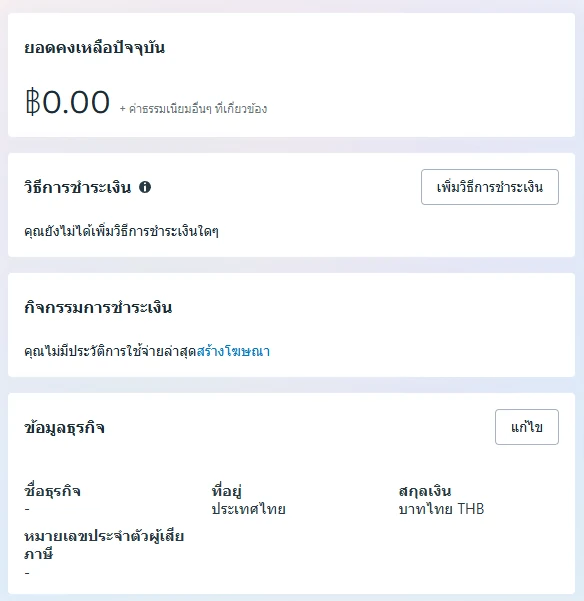
Coverage is limited to initial Facebook login and all nine ad accounts not being disabled or suspended at the initial delivery check. Report an initial issue to ADSWAR with the order number and evidence before use.
Ad accounts becoming disabled, suspended or restricted afterward are not covered and are not eligible for a claim, regardless of the cause. This includes losing access because the main Facebook account has a problem. A backup admin only reduces the risk of losing access. Ad approval and account status depend on Facebook.
Who is this bundle for, and who should think carefully?
It suits people managing several projects who understand ad account administration and want multiple accounts in one bundle, while being prepared to check delivery, arrange backup access and manage their own ad spend. If you only need one account, are not ready to manage several accounts, or expect a guarantee against accounts being disabled after use, review your needs and the conditions before ordering.
Common questions about the nine-ad-account bundle
Do I receive nine Facebook accounts?
No. The bundle includes one Facebook account with nine personal ad accounts associated with that Facebook account.
Does adding a backup admin once cover all nine accounts?
Check the permissions for each ad account. Do not assume that adding someone to one account gives them access to the whole bundle. Have the backup admin open and check each account individually using their own login.
Can an ad account still be disabled if it has a backup admin?
Yes, it can still be disabled or restricted. A backup admin does not change Facebook's decisions and does not automatically restore a suspended ad account.
Does THB 1,590 include advertising spend?
No. It is the account bundle price only. You must arrange your own budget and check each account's payment methods.
Need multiple accounts in one bundle? View this product
The bundle offers one Facebook account with nine ad accounts for THB 1,590, reduced from THB 2,000 for organizing work across multiple accounts. Check everything on delivery and prepare a backup admin before use. Choose based on the product details that suit your work and the conditions you accept.
View details and stock for ADSWAR's Facebook account with nine ad accounts bundle →
Read next: what to check when Facebook login shows Invalid request and why Facebook may prevent password changes on an unfamiliar device.
Product details and prices checked on 21 October 2026. Prices, stock, menus and Facebook permissions may change. Refer to the current product listing and actual account status when using the accounts.
Related posts
Back to Blog
Facebook and business portfolios
What is a Facebook UID? Can 1000x, 6157x or 6158x reveal account age?
What do Facebook UID prefixes 1000x, 6156x, 6157x and 6158x mean? Read product year examples, check account age and choose the right account specifications.
Facebook and business portfolios
Can't log in to Facebook? Try clearing cookies first
Facebook shows Invalid request and you cannot log in? Follow these illustrated Chrome steps to clear cookies and cached files, then start signing in again. Check which data to keep before deleting anything.
Facebook and business portfolios
Meta Pixel Helper Has a New Name: Check Events Before Scaling Ads
Meta Pixel Helper is now Meta Ads Data Advisor. Match Facebook events to real purchases, check Purchase and CAPI data, and compare advertising accounts and BM at ADSWAR.